
What The Hub is
The Hub is a folder on your computer and one Claude conversation that looks after it. The folder holds the facts of your business in plain files: what you do, who comes in, how you talk, your prices, your hours, how to reach you, and the questions people ask. Each fact lives in exactly one file.
You talk to The Hub. When you ask a question, it answers from those files and tells you which one. When you change a fact, it tells you everything that depends on it. Today nothing does. Each course you take later adds one specialist, such as a Listings agent for your Google profile or a Social agent for your posts, and plugs it in. They all read the same facts, so a new price goes everywhere it needs to, and you see each change before it happens.
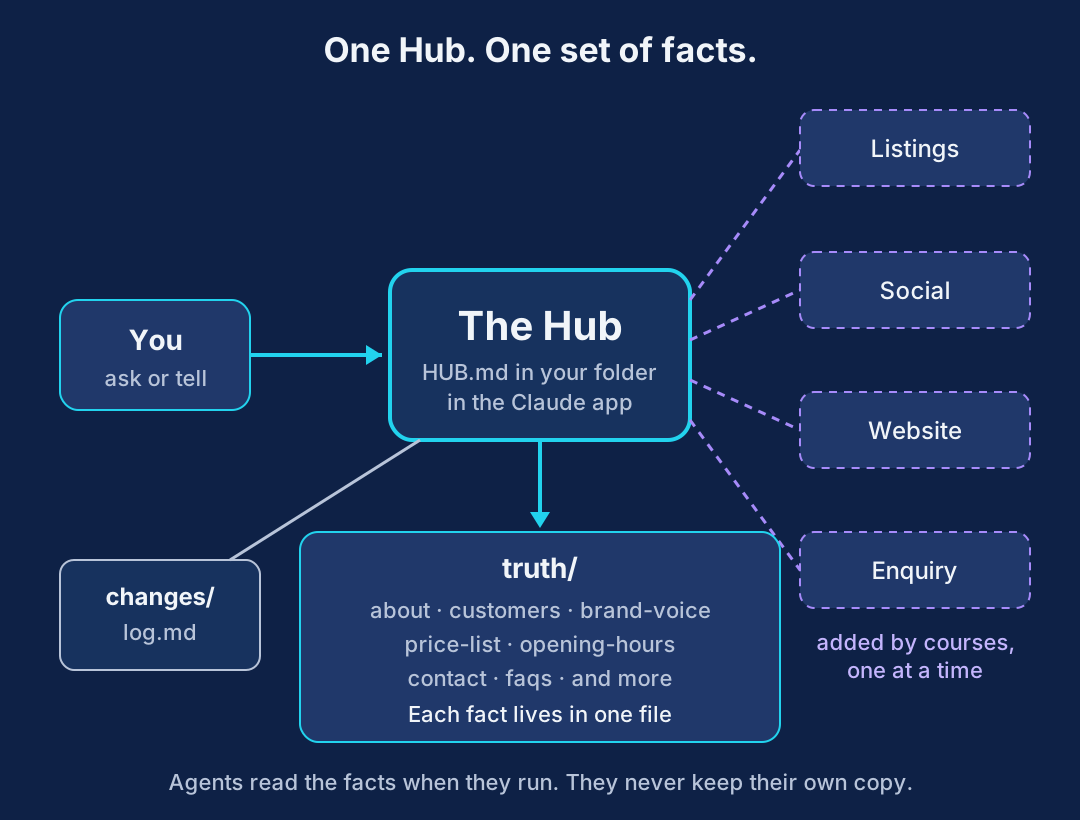
It's plain text files, so you can open any of them in Finder or File Explorer and read them yourself. Nothing is locked away.
Get these ready first
- The Claude desktop app on a computer, with a paid Claude plan. The Hub works on a folder, and that needs a plan that lets Claude open folders on your computer. Plans and features change, so check Claude's current plan page before you start and make sure it covers working with a folder on your kind of computer. If your plan can't, this lesson won't work yet. Every short course still works without a Hub.
- About 45 minutes, in one sitting if you can.
- Your prices as customers see them. A menu, a price list, or just a clear photo of your menu board or window card.
- Your opening hours, phone, email and address, and the link people use to book or order, if you have one.
- Five things you've written or said to customers. Emails, texts, Facebook replies. No writing? You'll record voice notes instead.
Keep figures out. Takings, margins, wages and bank balances never go in the facts. There's a separate private/ folder for those, and you don't need it today.
Make the folder
- Download the starter folder (
hub-starter.zip). - Open the zip. On a Mac, double-click it. On Windows, right-click it and choose Extract All.
- You now have a folder called The Hub. Move it somewhere you'll find again, such as Documents. Not Downloads, which people tidy away.
- Open it and have a look. Every file is empty apart from headings. That's right.
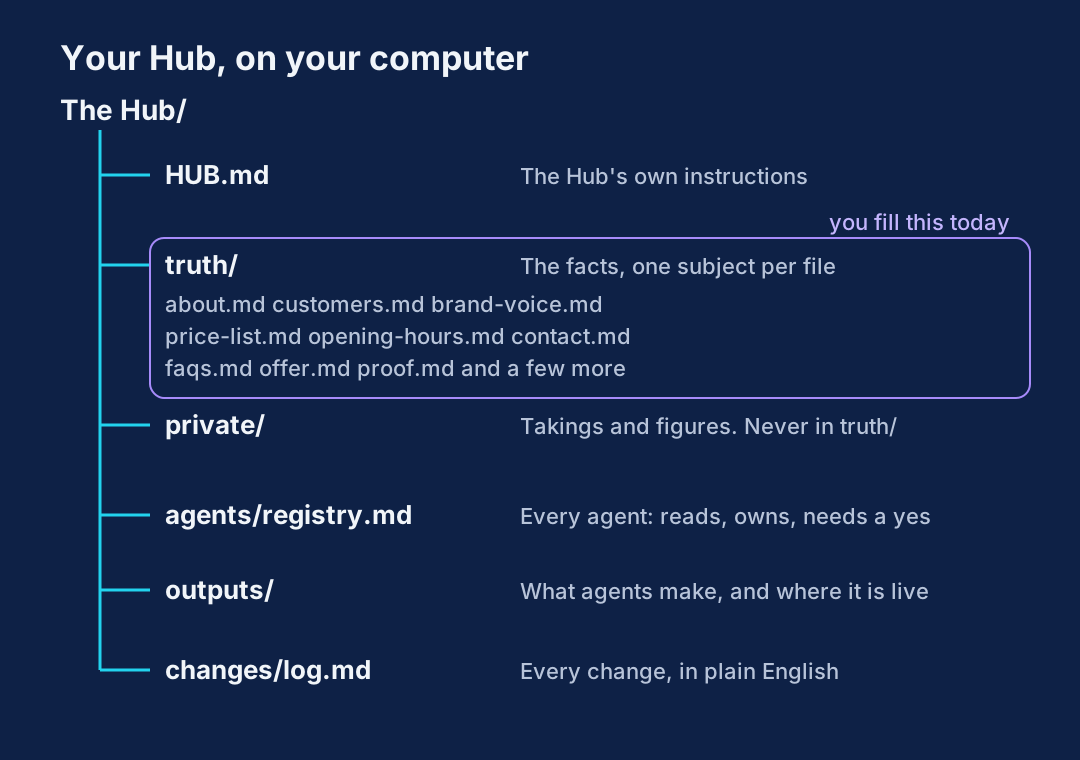
You'll only fill the truth/ files today. agents/, outputs/ and private/ stay empty until a course needs them. Don't rename the files: agents look for them by name.
Connect the folder in the Claude desktop app
- Open the Claude desktop app and sign in.
- Look for the option to work with a folder on your computer. Menu names change, so look for words like folder, choose folder or work in a folder near where you start a new task or conversation.
- Choose The Hub folder, the whole folder, not one file inside it.
- When Claude asks for permission to read and change files in that folder, allow it. The Hub needs to write your answers into the truth files.
Can't find a folder option at all? Your plan or your version of the app probably doesn't include it. Update the app, check the plan page, and if it still isn't there, stop here for now.
Give it HUB.md
HUB.md is The Hub's rulebook. It says where facts live, what to do when one changes, and that it must never guess a price, a time or a date. You never edit it.
If the app gives you somewhere to put standing instructions for this folder or project, open HUB.md, copy all of it, and paste it there. Either way, start your conversation with this:
Paste into Claude
Read HUB.md in this folder and follow it from now on. You are The Hub
for my business.

Then read truth/about.md and agents/registry.md, and tell me in three
short lines what you found. Both will be nearly empty. That's expected.
A good reply says the truth files are empty, there are no agents yet, and it's ready to fill them in. If it starts inventing a business, it hasn't read the folder. Check step 2.
Start every new conversation with The Hub the same way: "Read HUB.md and be The Hub."
Fill your truth files
Four short jobs. The Hub asks, you answer, it writes the files. Answer like you'd answer a nosy regular, not a form. Short is fine. Wherever you don't know something, it writes GAP rather than making it up.
4a. The interview: about, customers and faqs
Paste into Claude
Interview me about my business so you can fill in truth/about.md,
truth/customers.md and truth/faqs.md.

Ask ONE question at a time and wait for my answer. No lists to fill in.

Cover, in this order:
- What we do, in the words a customer would use
- Where we are, and who runs it
- What makes us specific: anything true and concrete, including what we
  don't do
- Who comes in or books, and who we'd like more of
- What people usually ask before they come in, book or buy, and how I
  answer each one

Don't ask about takings, margins, wages or any other figures.
If an answer of mine is vague, ask me to be more specific rather than
filling the gap yourself.

When you're done, show me the three files before you save them. Use my
words, not yours. Put today's date after "Last checked:" and "the owner"
after "Checked by:". Write GAP for anything I didn't answer, then list
every GAP at the end.
Worked example: a community café
Question 3 from The Hub: "What would a regular say makes you different from the other places in town?"
Owner: "No fryer, so no chips. We cook ahead and heat it up. Hot special every week in winter. Me and my son run it, in the old town hall."
A good answer looks like:
# about
Last checked: 16 Sep 2026
Checked by: the owner

Hadley Community Café. A coffee-led community café inside the old
town hall in Market Hadley, Suffolk. Run by a father and son.
Coffee, iced lattes and milkshakes, with paninis, jacket potatoes,
sweet and savoury crêpes and scones. A hot special every week in
winter. No fryer, so no chips: we cook ahead and heat to order.

# faqs (first lines)
Do you do hot food? Yes. Paninis, jackets, crêpes and a winter
special. No chips.
Can I bring the dog? GAP
Can 10 of us come in for a birthday? GAP

Gaps: dog policy, largest group, parking.
Fill the easy gaps now. Leave the ones you haven't decided as GAP. That's honest, and The Hub will say "I don't know" instead of guessing.
4b. Your voice: brand-voice
Find five things you've really sent to customers. Your normal writing, not your best. No writing? Record three voice notes on your phone answering customer questions as if they were at the counter, use your phone's transcribe option, and paste the text in. Spoken words are often a better sample.
Paste into Claude
Below are things I've really written or said to customers. Work out
how I talk and write, and fill in truth/brand-voice.md.

Cover: sentence length, contractions, how I open and sign off, words I
use a lot, words I never use, how formal or blunt I am, and what I do
when I say no or give a price.

"Friendly and professional" is useless. Be specific enough that a
stranger could write like me. Then write three example sentences in my
voice so I can check. Show me the file before you save it.

[PASTE FIVE MESSAGES, EMAILS OR VOICE NOTE TRANSCRIPTS HERE. SAY IF THEY'RE SPOKEN.]
Worked example: a community café
Pasted in: three voice note transcripts, marked as spoken. One was: "Oh yeah, dogs are fine, we've got a water bowl by the door. Just not on the chairs, if you don't mind."
# brand-voice
Sentences: short, mostly under 15 words.
Contractions: always. We're, you'll, don't.
Opens: "Hi [name]," then straight to the answer.
Signs off: "Cheers," and first name.
Words we use: proper, pop in, made here.
Never: delighted, reach out, bespoke, artisan. No exclamation marks.
Saying no: straight and kind, with an alternative.

Examples:
1. "Yes, we're open Saturday. Come before twelve if you want a table."
2. "We don't take bookings as such, but tell me when and how many."
3. "Hot food's on all day and it's all made here."
If the examples sound like a brochure, say exactly what's wrong ("I'd never say 'reach out'") and ask again. Two goes is normal.
4c. Your prices: price-list
Two routes. Use whichever matches what you've got.
Got a price list or menu as a file? Drop it into The Hub folder, or attach it to the chat, and say which file it is.
Got a menu board, not a document? Most cafés and shops do. Take a clear photo of the board, straight on, in good light, close enough to read every price. Attach the photo to the chat.
Paste into Claude
I've attached [MY PRICE LIST / A PHOTO OF MY MENU BOARD]. Fill in
truth/price-list.md from it, as a table: item, price, notes.

Rules:
- Copy every price exactly as shown. Never round, estimate or fill in a
  price you can't read.
- If a price is blurred, cut off or missing, write GAP in the price
  column and list it at the end.
- Sizes and extras get their own line.
- Only customer prices. No costs or margins.

Show me the table before you save it, so I can check every line.
Worked example: a photo of the menu board
# price-list
Last checked: 16 Sep 2026
Checked by: the owner

| Item | Price | Notes |
|---|---|---|
| Latte | £3.20 | Oat milk 30p extra |
| Iced latte | £3.60 | |
| Bacon, cranberry and brie panini | £6.90 | |
| Jacket potato, cheese and beans | £6.50 | |
| Savoury crêpe, ham and cheese | GAP | Price hidden behind the till |
| Winter special | GAP | Changes weekly |

Gaps: savoury crêpe price, winter special price.
The owner read every line against the board, fixed one latte price the photo had caught badly, and filled both gaps. Check yours the same way. A wrong price here goes everywhere later.
4d. Hours and contact: opening-hours and contact
Paste into Claude
Fill in truth/opening-hours.md and truth/contact.md. The files already
have the headings.

Ask me for each day's opening and closing time, then bank holidays and
any seasonal changes. Then ask me for the phone, email, full address
with postcode, website, Facebook and Instagram addresses, Google
profile link, and how people book or order.

One question at a time. If I say "not sure", write GAP. Show me both
files before you save them.
Tip: copy your hours from your door sign or Google profile if they're right. If the sign and Google disagree, that's worth knowing, and worth fixing after this lesson.
Save it in the log
Paste into Claude
Add an entry to changes/log.md: today's date and time, "Hub started",
which truth files were filled in, and the full list of GAPs still open.Test it with three customer questions
Ask the kind of thing customers really ask you. Include one you know is a gap.
Paste into Claude
Answer these as The Hub, from truth/ only. For each, say which file the
answer came from. If the answer isn't there, say so and don't guess.

1. [A QUESTION ABOUT OPENING TIMES, e.g. "Are you open Sunday afternoon?"]
2. [A QUESTION ABOUT PRICE, e.g. "How much is a panini?"]
3. [A QUESTION YOU KNOW IS A GAP, e.g. "Can I bring my dog?"]
Worked example: a community café
1. Yes, Sunday 10am to 4pm. (truth/opening-hours.md)
2. The bacon, cranberry and brie panini is £6.90.
   (truth/price-list.md)
3. I don't know. The dog policy is a GAP in truth/faqs.md.
   Want to tell me the answer so I can add it?
Number 3 is the one that matters. A Hub that says "I don't know" is working. A Hub that says "dogs are welcome" when nobody told it is not.
If any answer came from nowhere, tell it: "That wasn't in truth/. Follow HUB.md: never guess." Then check the file it should have used.
Your first change
This is the part every later course builds on. Change one real fact, and watch what The Hub does with it.
Paste into Claude
A fact has changed: [e.g. "From next week we close at 3pm on Sundays,
not 4pm."]

Follow HUB.md for a changed truth file: update the file, then give me
the report with the four headings, and add it to changes/log.md.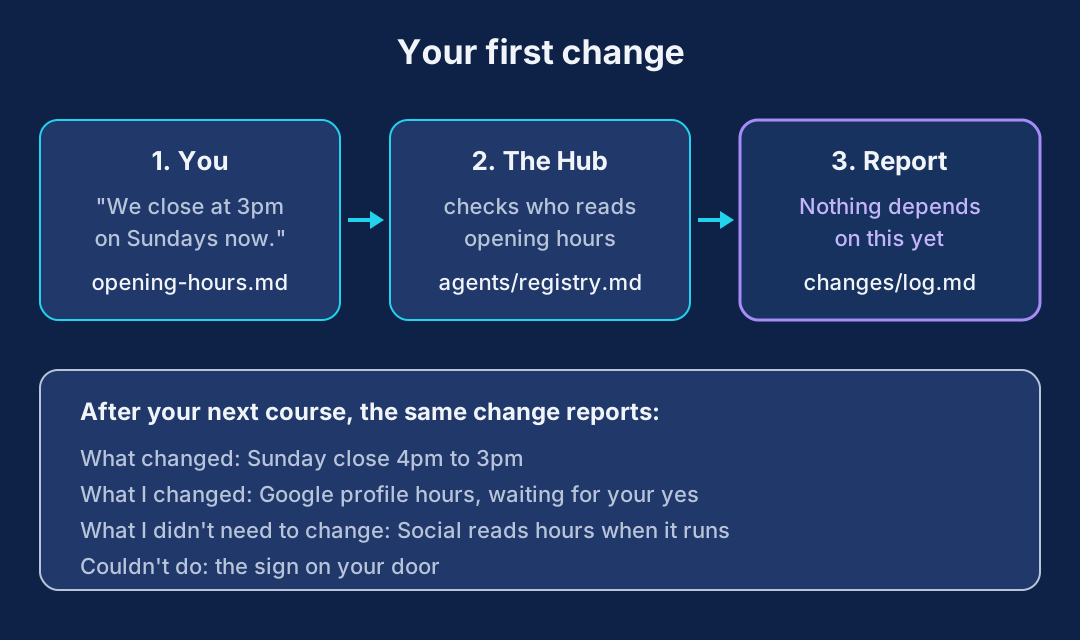
Worked example: the report
Opening hours updated, 16 Sep 2026, 15:10

What changed
- Sunday closing time, 4pm to 3pm

What I changed
- truth/opening-hours.md

What I didn't need to change
- Nothing depends on this yet. There are no agents in the registry.

Couldn't do
- The sign on your door and your Google profile. I can't see either
  from here, so those are yours for now.
"Nothing depends on this yet" is the right answer today. After Found by AI, the same change finds your Google profile. After A Week Of Posts, it checks your queued posts too. That's the point of doing this once.
You've got a working Hub when
- The Hub folder is somewhere you'll find it, connected in the Claude desktop app
- about, customers, brand-voice, price-list, opening-hours, contact and faqs are filled in, or marked GAP
- Every price was checked by you against the real menu or list
- The Hub answered three customer questions and said "I don't know" to the gap
changes/log.mdhas your "Hub started" entry and your first change
Plug things into it
Every short course works with or without a Hub. With one, you point the prompts at your Hub instead of typing your business in, and the last lesson of each course, Plug it into The Hub, adds that course's agent to your registry.
Short courses, £139 each
Found by AI adds a Listings agent. A Week Of Posts adds Social. The Enquiry Engine adds Enquiry. Each one self-paced, online.
See the short coursesThe full version, in person
The Business Hub Dashboard course builds The Hub properly over two full days, with Paul in the room: every truth file, the private folder, the registry and the change routine. Saturday 31 October and Sunday 1 November 2026, Ipswich Town Football Club. £3,495.
Business Hub DashboardMembers can also find the lessons every course leans on, like the business interview, your voice card and publishing a page, in Foundations in the members' area.
Stuck on any of this? Email hello@aiconfidencecoach.uk.